

Creating a blog does not need any coding skills or a large budget anymore. Wix also provides the ease of blogging to new users and, at the same time, provides flexibility to advanced creators. If you’re wondering if Wix can be used for blogging, the short answer is yes, and very effective.
This article walks through how to create a blog in Wix, organize your posts, and set up a blog website that’s easy to manage and ready to grow.
Why Use Wix for Blogging?
Wix is not a mere site builder. It is a complete publishing system that is aimed at individuals who do not desire technical hassles. Websites with blogs get 86% more organic traffic than those without a blog, proving that blogging boosts visibility and engagement.
Here’s why many creators choose Wix for blogging:
- No coding required
- Inbuilt blog and search engine optimization.
- Drag-and-drop editor
- Personal blog to business sites.
Whether you’re launching a personal journal or building a branded Wix blogging site, the platform gives you everything you need to publish confidently.
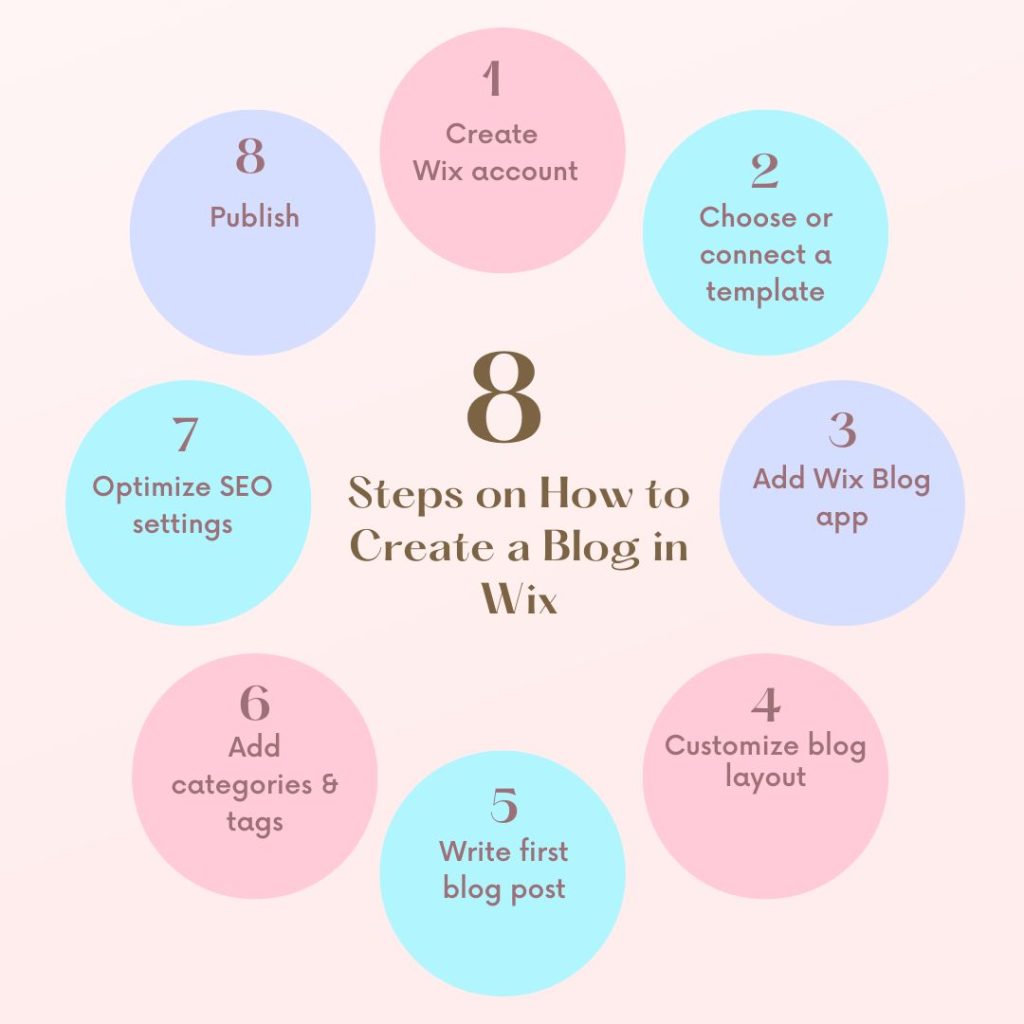
How to Create a Blog in Wix (Quick Overview)?
The process of setting up the system looks like the following before getting down to the details:
- Open or open an account with Wix.
- Add the Wix Blog app.
- Customize your blog layout.
- Create your first post.
- Categorize and tag posts.
The steps are easy to follow, and minor choices at the beginning are significant in the future. There are an estimated 600 million blogs worldwide, with over 7.5 million posts created daily, highlighting the scope of online blogging.
Step 1: Set Up a Blog Website on Wix
In case you do not have a site, begin by selecting a Wix template. You havethen option of choosing a blog-oriented template or integrating a blog into an already existing site.
To add a blog:
- Open the Wix Editor
- Click Add Apps
- Search for Wix Blog
- Click Add to Site
Wix automatically creates:
- A main blog page
- Individual post pages
- A post editor dashboard
This arrangement saves hours on construction as compared to constructing everything manually.
Step 2: Customize Your Wix Blogging Site Layout
The design of your blog influences the level of readability, engagement, and trust. Wix does not have overwhelming settings and allows full control.
You can customize:
- Blog feed format (grid, list, magazine)
- Sidebar (categories, recent posts) elements.
- Fonts and colors
- Mobile layout
Keep the design clean. Distractions should not be the focus of the reader’s attention s on your content.
Step 3: How to Start a Wix Blog Post
After adding the blog, it is easy to write your first post.
From your dashboard:
- Go to Blog – Create New Post
- Add a title and body content
- Divide sections with headings.
- Add pictures, videos, or galleries.
The editor of Wix is like a document editor, and it is not difficult to format the content without technical work.
You can save the drafts as you write and publish them when you are ready.
Step 4: Categorize Posts
Categories are essential for any successful Wix blogging site. They assist the readers in locating related content and maintain your blog in an organized manner as it expands. Longer blog content typically receives 77.2% more external links than shorter posts, underscoring depth and organization value.
Examples of categories:
- Tutorials
- Tips & Guides
- News
- Case Studies
Best practices:
- Use 5-8 main categories
- Keep names short and clear
- Each post has one major category.
Properly structured blogs are more search engine-friendly and keep visitors spending more time on them.
Step 5: Improve Navigation by Tags
Tags are not similar to categories. They outline certain issues in a post.
For example:
Category: Blogging
Keywords: Wix SEO, blog design, content strategy.
Tags:
- Improve internal linking
- Assist users in searching for related posts.
- Support long-tail search queries.
Avoid overusing them. Limit yourself to 3-6 tags per post.
Step 6: Blog Management Before Publication
Check your blog settings before launching.
Key settings to adjust:
- Blog name and description
- Comment moderation
- Social sharing buttons
- Post URL structure
This is a step that is not followed, but it determines the appearance of your Wix blog website to the readers and search engines.
Step 7: Wix Blogging SEO Basics
One of the questions that is frequently asked is whether it is possible to blog using Wix with the aim of SEO. Yes, when properly used. 71% of bloggers report SEO as the most vital way to increase blog traffic, proving that organized and optimized posts matter.
For each post:
- Customize the SEO title
- Write an attractive meta description.
- Optimize URLs
- Add image alt text
Wix has built-in SEO features that take you through the optimization process without the use of any plug-in.
Internal connections between blog posts also enhance the discoverability and retention of readers.
Step 8: Plan and control Blog material
It is consistency that is more important than frequency. Wix allows you to pre-plan your posts, which is a way of keeping the momentum.
You can:
- Schedule future posts
- Update older content
- Copy posts as templates.
This is especially useful if you’re using Wix for blogging as part of a business or content strategy.
Step 9: Maintain Your Blog in the Long Run
Maintenance is necessary as your content library increases. 68% more traffic arises from indexing more blog pages when a blog is actively maintained and updated over time.
Smart habits include:
- Categorizing after every couple of months.
- Updating outdated posts
- Enhancing the older posts with more visuals or SEO.
- Elimination of redundant or weak content.
A blog that is well-maintained is a sign of quality to the users and the search engine.
Step 10: Wix Blogging: 10 Mistakes to Avoid
Poor structure can never be corrected by a powerful platform.
Watch out for:
- Posting posts without categories.
- Ignoring mobile layout
- Using vague titles
- Forgetting SEO settings
- Inconsistent formatting
These mistakes can be avoided to save time and enhance performance in the initial stages.
Is Wix a Long-term Blogging Solution?
For most creators, yes.
Wix works well for:
- Personal blogs
- Portfolio blogs
- Small business blogs
- Content-driven websites
If your goal is to set up a blog website without dealing with hosting, plugins, or technical upkeep, Wix is a solid choice.
Conclusion
Blogging does not necessarily need to be a complex and technical process. Once you understand how to create a blog in Wix, the platform gives you everything needed to publish, organize, and grow your content with confidence.
Whether it comes to the creation of your site or the organization of categories, tags, and SEO, Wix makes blogging friendly to beginners, and at the same time, it supports long-term objectives. Having a clear structure and regular posting, a Wix blog can become a potent instrument of visibility, interaction, and development.
Keep it simple, concentrate on useful information, and perfect it along the way. Your blog will grow, and Wix will grow with it.
FAQs
1. Can Wix be used for blogging?
Yes, Wix has built blogging features, search engine optimization, customized designs, and simplified content management for both the novice and the professional.
2. Is Wix suitable for beginners as a blogging platform?
Wix is user-friendly, with drag-and-drop, premade templates, and easy blog creation without any coding or technical expertise.
3. Is Wix blogging SEO friendly?
Wix offers SEO options, custom URLs, meta tags, image alt text, and built-in search engine optimization tools on the posts of the blog.
4. Is it possible to arrange blog posts on a Wix site?
Yes, Wix enables organizing posts by categories and tags, to enable readers to navigate the content and enhance the overall structure of the blog.
5. Is Wix appropriate for business blogging?
Wix is suitable for business blogs, where branding is available, content can be scheduled, lead capture tools are provided, and it can be integrated with marketing features.