
Email marketing continues to provide one of the best ROI in the digital medium.
The difference between average results and exceptional ones often comes down to email workflow automation.
Automation enables the brands to reach the right time, with the right message, without manual work, instead of sending a one-off campaign.
Automated workflows, when configured correctly,y generate leads, salvage lost sales, es and establish long-term customer relationships. Automated emails achieve 52% higher open rates, 332% higher clicks, and 2,361% better conversion rates than regular campaigns.
This article breaks down how email automation works, how to build effective workflows, and real email automation examples you can model for your own business.
What Is Email Workflow Automation?
Email workflow automation is the process of sending emails automatically based on predefined triggers, actions, or user behavior.
Instead of having to press a button marked send, your system responds when a subscriber does something – or fails to do something.
Typical triggers include:
- Signing up for a newsletter
- Downloading a resource
- Making a purchase
- Abandoning a cart
- Being idle for a stipulated time.
Upon activation, the workflow sends a series of emails that are meant to lead the subscriber to an objective.
This is where email workflow automation becomes powerful.
It eliminates speculation, and all subscribers receive relevant information at the appropriate time.
How Does Email Automation Work Behind the Scenes?
The knowledge of the email automation functionality makes it more straightforward to develop workflows that are effective. In 2025, roughly 58% of businesses use email automation; automated sends account for 41% of all email-driven orders.
In essence, automation has a straightforward design:
Trigger
The workflow is initiated by a particular action.
These can be form submissions, purchases, or visits to pages.
Conditions
Rules dictate the course of action.
Send email A, in case the user clicks this link. If not, send email B.”
Actions
The system sends emails, delays, updates tags, or moves contacts to new workflows.
Timing
The spacing of emails is done deliberately.
This will avoid inbox overload and enhance interaction.
Email workflow automation platforms combine these elements into visual builders, making complex logic easier to manage without technical expertise.
Why Email Workflow Automation Matters for Growth?
Email marketing is not scalable using manual methods.
Automation bridges that gap without compromising on personalization.
Here’s why businesses rely on email workflow automation:
- Increased engagement rate as a result of behavior-based messaging.
- Regular follow-ups with no human error.
- Better lead nurturing in long sales cycles.
- Recovery of revenues via abandoned cart and re-engagement flows.
- Saving time in marketing and sales.
Automated workflows react in real-time and keep your brand in mind instead of seeking subscribers.
Core Types of Email Workflow Automation You Should Use
The purpose of all workflows is not the same.
Each promotes a step of the customer journey.
Welcome Email Automation
This happens when a person becomes part of your list.
Efficient welcome processes:
- Set expectations
- Introduce your brand voice
- Deliver promised content
- Encourage the first action
This workflow is necessary because many brands achieve high open rates in welcome emails.
Lead Nurturing Workflows
The purpose of this was to educate and gain trust in the long run.
These workflows:
- Share helpful content
- Address common objections
- Gradually introduce offers
Lead nurturing is one of the strongest email automation examples for B2B and service-based businesses.
Abandoned Cart Automation
Activated when a customer puts items in the cart and fails to check out.
Good performing abandoned cart processes may involve:
- A reminder email
- Social evidence or recommendations.
- A limited-time incentive
This form of email workflow automation can recover a significant percentage of lost revenue. Automated emails can generate about 320% more revenue than non-automated campaigns, with 1 in 3 clicks leading to purchases.
Post-Purchase Follow-Up
The automation does not end with the sale.
Post-purchase workflows:
- Confirm orders
- Offer onboarding or tips of use.
- Request reviews
- Recommend other products.
This ensures that customers remain active even after checkout.
Re-Engagement (Win-Back) Workflows
Triggered by inactivity.
These workflows:
- Remind subscribers of the reason for joining.
- Provide special content or offers.
- Clean dirty contacts out of your list.
Re-engagement is essential to list health and deliverability.
Tools Required for Email Workflow Automation
The selection of the appropriate platform makes it easy.
Most email automation tools include:
- Visual workflow builders
- Behavioral triggers
- Audience segmentation
- Analytics and reporting
Popular platforms supporting email workflow automation include HubSpot, Mailchimp, Klaviyo, ActiveCampaign, and ConvertKit.
This is because the most appropriate option is determined by your business model, list size, and the complexity of automation. Triggered emails achieve open rates around 70% higher and click-through rates 152% higher than standard campaigns.
Step-by-Step: How to Set Up Email Workflow Automation?
When you have a clear process, it does not need guesswork to construct workflows.
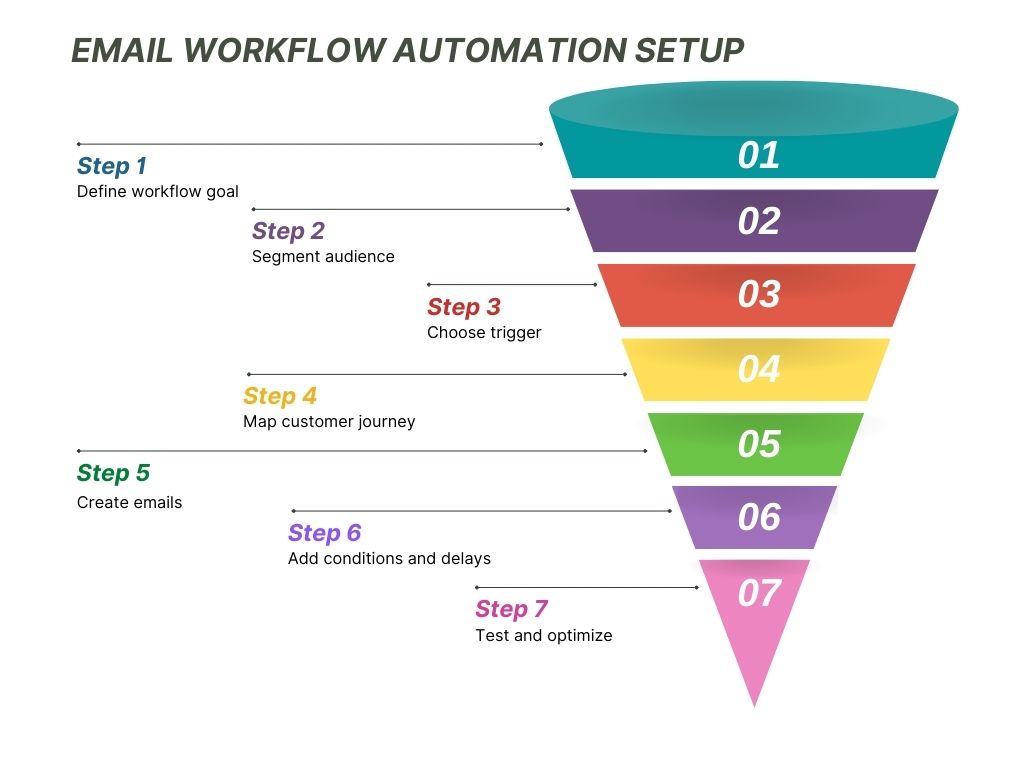
Step 1: Define a Single Goal
Every workflow must be geared towards a single result.
Examples:
- Convert leads
- Activate new users
- Recover abandoned carts
Everything that follows is determined by clarity.
Step 2: Find Your Audience Segment
Do not send automation to all.
Segment by:
- Behavior
- Purchase history
- Engagement level
- Funnel stage
The more effective the segmentation is, the more effective the results.
Step 3: Select the Appropriate Trigger
Triggers start the workflow.
Examples include:
- Email signup
- Resource download
- Checkout abandonment
Ensure that the trigger is in line with your workflow objective.
Step 4: Customer Journey Map
Write an overview of every email before construction.
Ask:
- What is the next thing that the subscriber requires?
- What are some of the objections they may have?
- What is the action to be taken for each email?
This eliminates sporadic or frequent messages.
Step 5: Compose Human Email Content
Automation is not supposed to be robotic.
Effective emails:
- Speak in a conversational language.
- Focus on one clear CTA.
- Go beyond first names.
Strong copy is what turns email workflow automation into revenue.
Step 6: Insert Delays and Conditions
Timing matters.
It is usually effective to space emails 1-3 days apart, depending on the purpose.
Conditional logic enables your workflow to become more relevant by changing according to engagement.
Step 7: Test Before Launch
Always test:
- Links
- Personalization fields
- Timing logic
This avoids shameful mistakes and shattered experiences.
Step 8: Monitor and Optimize
Automation of email has enhanced over time.
Track:
- Open rates
- Click-through rates
- Conversion metrics
Test this information to improve the subject lines, timing, and message.
Email Automation Examples That Drive Results
The experience of automation can be used to explain its effects. Abandoned cart automated emails can see open rates of about 50.5% and click-through rates of over 23%.
Example 1: Onboarding SaaS Workflow
Trigger: Free trial signup
- Email 1: Welcome + setup steps
- Email 2: Feature spotlight
- Email 3: Case study
- Email 4: Expiration of trial reminder.
This process reduces the time-to-value and the number of paid conversions.
Example 2: E-commerce Abandoned Cart Workflow
Trigger: 2 hours of cart inactivity.
- Email 1: Cart reminder
- Email 2: Product advantages + reviews.
- Email 3: Discount or urgency
Uncomplicated reasoning, high revenue influence.
Example 3: Content-Based Lead Nurturing
Trigger: Ebook download
- Email 1: Related blog content
- Email 2: Breakdown of problem-solution.
- Email 3: Introduction of soft products.
This is a pre-sale trust building.
Best Practices for Email Workflow Automation
Good workflows are based on established principles.
- Concentrate on relevance, not quantity.
- Behavior-based personalization.
- Optimize for mobile reading.
- Keep CTAs clear and singular.
- Periodically review dormant processes.
These practices help email workflow automation stay effective long-term.
Top Email Automation Tools to Avoid
Even seasoned teams falter in this.
Avoid:
- Saturating workflows with emails.
- Ignoring segmentation
- Sending generic content
- Neglecting the rules of compliance.
- Failing to review performance.
Automation can only be effective when it remains in line with the audience’s behavior.
How to Measure Email Workflow Automation Success?
Data shows what’s working.
Key metrics include:
- Open rates
- Click-through rates
- Conversion rates
- Revenue attribution
- Unsubscribe rates
Compare workflow performance to find optimization opportunities.
Conclusion
Email workflow automation turns email marketing into a predictable growth engine.
Workflows that are aligned with actual user behavior form meaningful conversations at scale.
The outcome is the increased involvement, improved conversions, and reduced manual labor.
Begin with a single workflow, optimize it, and grow.
In the long run, automation is one of the most useful systems in your marketing stack.
FAQs
1. What is email workflow automation?
Email workflow automation sends emails automatically based on user actions, timing, or conditions without manual intervention.
2. How does email automation work?
Email automation is achieved by activating emails based on pre-established rules, user actions, conditions, and pre-established delays in an email service.
3. What are common email automation examples?
The typical examples are welcome sequences, abandoned cart reminders, lead nurturing campaigns, post-purchase follow-ups, and re-engagement workflows.
4. Is email workflow automation suitable for small businesses?
Yes, email workflow automation helps small businesses save time, personalize communication, and scale marketing efforts efficiently.
5. What is the number of emails in an automated workflow?
The best email workflows consist of three or seven emails based on the purpose of the audience, the duration of the buying cycle, and the level of engagement.