
Manual processes slack teams more than most businesses think. Minor delays add up, mistakes creep in, and workers waste hours on work that does not add much value. This is where workflow automation changes how organizations operate.
Automated workflows eliminate friction in daily activities, and teams can focus on truly important tasks, whether it is marketing and sales, HR, or finance. Before diving into tools or tactics, it helps to clearly understand what workflow automation is, how it works, and why it delivers such measurable results.
What Is Workflow Automation?
Workflow automation refers to using technology to execute recurring tasks or processes automatically based on predefined rules. Rather than individuals manually transferring work between one step and another, software does the transfers.
At its core, workflow automation’s meaning is simple:
A task is activated, rules are executed, and actions occur without human intervention.
For example:
- A lead completes a form – it is added to a CRM – and a follow-up email is received.
- An employee requests leave – the manager is informed – HR records are changed.
When people ask what workflow automation is, the easiest answer is this: it’s a digital system that runs your routine processes consistently and efficiently.
How Workflow Automation Works (Without the Technical Jargon)
Any automated workflow consists of three fundamental elements:
Triggers
These start the workflow.
Examples are form submissions, status changes, or time-based events.
Rules and Logic
Regulations determine further actions.
“If X happens, then do Y.”
Actions
Actions are the things that are carried out automatically, e.g.:
- Sending emails
- Updating databases
- Assigning tasks
- Generating reports
Once configured, workflow automation runs quietly in the background, reducing delays and eliminating repetitive work.
Why Workflow Automation Matters for Modern Businesses?
The use of email threads, spreadsheets, and manual approvals is still common in many teams. Although these methods are familiar, they do not address the increase in operations. 94% of workers perform repetitive tasks that could be automated, saving up to 60–90 minutes of productive time daily.
Why workflow automation has become essential:
- Work is quicker than people can follow manually.
- Customers want to get immediate answers.
- Teams work within tools and time zones.
- Mistakes are more expensive than they have ever been.
Workflow automation creates a structure without rigidity. Processes remain constant and yet remain flexible in case of exceptions.
Key Workflow Automation Benefits That Drive Real Results
Automation is not about eliminating human beings. It is about eliminating barriers that can hinder their optimum work. The workflow automation benefits below explain why adoption continues to rise across industries. Companies that adopt intelligent automation see average cost reductions of about 22% within three years.
Greater Efficiency and Productivity
Robots do not require repetitive workflows that consume time and focus.
Work is done more quickly by teams that do not rush or multitask.
Employees are not interested in approvals or copying data, but instead they concentrate on strategy, creativity, and decision making.
Less Accuracy and Fewer Errors
Paperwork is prone to errors, particularly when one has to perform the same task daily.
Automation:
- Rules are applied in the same way.
- Prevents missed steps
- Guarantees clean and consistent data.
This uniformity enhances reporting, compliance, and confidence in business systems.
Lower Operational Costs
Saving time is directly proportional to saving costs.
Businesses reduce:
- Administrative labor
- Rework caused by errors
- Delays that impact revenue
In the long run, automated workflows can be self-financing.
Improved Cooperation and Transparency
Workflow automation clarifies ownership and progress.
Everyone knows:
- What’s pending
- Who’s responsible
- What comes next
Such transparency minimizes follow-ups and ensures the smooth running of projects.
Better Customer Experience
Internal processes are not visible to customers, but the outcomes are experienced.
Automated workflows enable:
- Faster responses
- Consistent communication
- Fewer dropped requests
The result is increased satisfaction and smooth interactions.
Scalability Without Chaos
Weak processes are revealed through growth.
Workflow automation scales operations without adding complexity.
The same applies to new tasks, regardless of how high the volume is.
Workflow Automation Examples Across Key Business Functions
Seeing workflow automation in action makes its value clearer. These workflow automation examples show how different teams use automation daily. Automated workflows can reduce employee onboarding time by up to 50% and speed customer responses by 63%.
Marketing Workflow Automation Examples
Marketing departments are dealing with leads, campaigns, and content.
Some of the common automated workflows are:
- Lead capture – CRM update – email nurturing
- Approval of content – publication – performance monitoring.
- Registration of webinars – reminders – follow ups.
The automation will make sure that the leads do not fall through the cracks.
Sales Workflow Automation Examples
Sales are a matter of speed and time.
Automation supports reps by:
- Allotment of leads according to rules.
- Automatic updating of deal stages.
- Follow up after meetings.
The sales teams also take less time to update systems and more time to close.
HR Workflow Automation Examples
HR procedures are time-consuming and detailed.
Automated workflows handle:
- Employee onboarding
- Leave approvals
- Policy acknowledgments
New employees feel encouraged, and human resource departments remain in order.
Examples of Finance and Accounting Automation
In finance, accuracy is the most important thing.
Automation helps with:
- Invoice approvals
- Expense reimbursements
- Payment reminders
The financial processes are quicker without losing control.
Customer Support Workflow Automation Examples
Support teams handle large number of requests. 50% of IT help-desk requests are handled automatically, cutting resolution times by roughly 45%.
Automated workflows enable:
- Issue type of routing of tickets.
- Priority escalation rules
- Auto answers to frequently asked questions.
Agents are able to resolve issues faster and with less effort to the customers.
Workflow Automation Tools and Technologies
Automation is now available using modern tools without strong technical expertise.
No-Code and Low-Code Platforms.
These platforms enable teams to develop workflows with visual builders rather than code.
They are perfect for non-technical users.
Integration-Friendly Systems
Most of the tools integrate with CRMs, email, project management, and accounting software.
The appropriate platform fits perfectly well in the current operations.
How to Get Started with Workflow Automation?
To begin with, it is not necessary to automate everything initially. A narrow strategy is more effective. 59% of organizations have already implemented automation tools, validating widespread adoption.
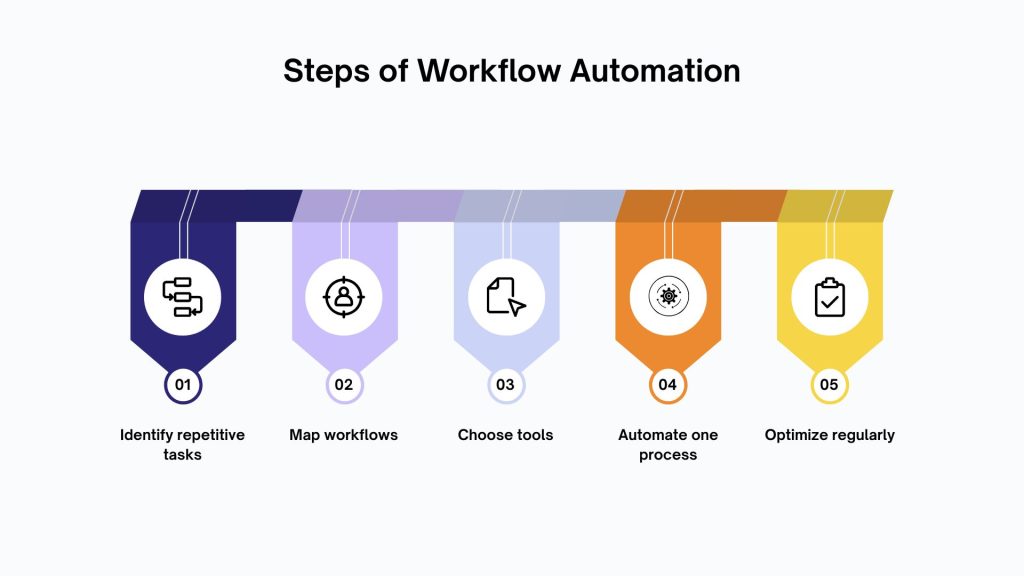
Step 1: Determine Repetitive Tasks.
Look for tasks that:
- Occur frequently
- Follow clear rules
- Consume unnecessary time
Step 2: Map the Existing Workflow.
Record every step in its present state.
This brings out inefficiencies and bottlenecks.
Step 3: Choose the Right Tool
Choose a platform that will be integrated with existing systems and will allow the company to grow in the future.
Step 4: Start Small
Automate a workflow, measure results, and repeat.
Step 5: Optimize and Improve
Automation is best reviewed and refined on a regular basis.
Best Practices for Successful Workflow Automation
There are pitfalls to avoid by adhering to established principles.
- Make work processes lean and mean.
- Involve stakeholders early
- Logically automate documents.
- Measure performance indicators.
- Create flexibility to exceptions.
Good automation is not obtrusive.
Difficulties and Obstacles to Consider
Workflow automation isn’t a one-time setup.
The possible obstacles are:
- Initial setup complexity
- Opposition to process change.
- Automation of work requires human judgment.
- Limitations of integration of tools.
Consciousness assists teams to plan and not frustrate.
The Future of Workflow Automation
Automation is not a static concept, but it is no longer limited to simple rule-based workflows.
Emerging trends include:
- AI-driven decision logic
- Predictive task routing
- Smart automation which is learned as it goes.
As systems become smarter, workflow automation will play an even larger role in business operations.
Conclusion
Understanding what is workflow automation helps clarify why it delivers such strong returns. It eliminates inefficiencies, minimizes errors, and develops scalable processes that facilitate growth.
Early adopters of automation develop operational resilience and liberate their staff to do valuable work.
If repetitive tasks slow your team down, it’s time to explore workflow automation.
Begin small, select the appropriate tools, and develop processes that can perform even when you are not present.
Want to help design or implement workflow automation for your business?
Contact us today to make daily operations efficient and automated.
FAQs
1. What is workflow automation?
Workflow automation uses software to complete repetitive tasks automatically based on predefined rules and triggers.
2. Why is workflow automation important?
It enhances efficiency, minimizes errors, saves costs, and teams are able to scale operations without adding to the manual workload.
3. What are common workflow automation examples?
They can lead routing, invoice approvals, employee onboarding, customer ticket assignment, and automated email follow-ups.
4. What are the main workflow automation benefits?
More rapid procedures, reduced mistakes, enhanced visibility, reduced expenses, increased cooperation, and increased customer experience.
5. Who should use workflow automation?
Companies of any size with repetitive and rule-based operations in marketing, sales, human resources, finance, or support departments.